
Seeing high impressions but very low clicks in Google Search Console (GSC) can be frustrating. Your pages are appearing in Google search results, yet users are not clicking. This situation usually indicates a CTR (Click-Through Rate) problem, not a ranking or indexing issue.
The good news?
One of the simplest SEO issues to correct is low CTR, but only if you know the causes.
This guide covers the reasons behind the drop in CTR, how to diagnose the precise cause with GSC, and practical solutions aligned with Google’s recommendations.
What is the meaning of High Impressions and Low clicks?
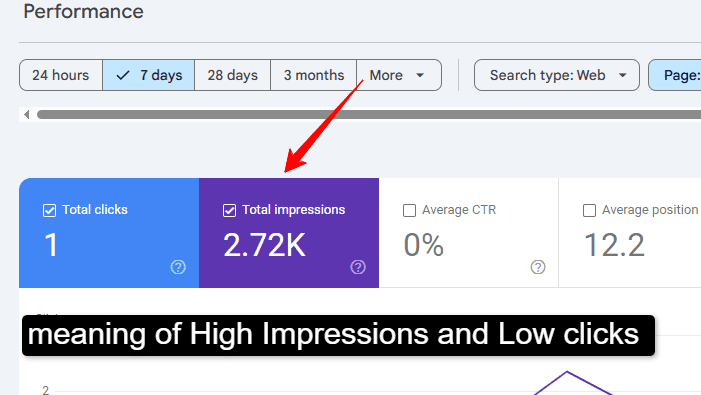
In Google Search Console:
-
Impressions = how often your page appears in search results
-
Clicks = how many users actually visit your page
-
CTR = clicks ÷ impressions × 100
If impressions are deep but clicks are low, it means:
Google finds your page relevant enough to show it, but users don’t find it compelling enough to click.
This is a SERP optimization problem, not a content visibility issue.
How to Identify Low CTR Pages in Google Search Console
Follow these steps:
-
Open Google Search Console
-
Go to Performance → Search Results
-
Enable:
-
Clicks
-
Impressions
-
CTR
-
Average Position
-
-
Sort pages or queries by:
-
High impressions
-
Low CTR
-
Positions between 3–15
-
These pages offer your best opportunities for CTR improvement.
Top Reasons for High Impressions but Very Low Clicks
1. Weak or Unattractive Title Tags
Your title is the first thing users see. If it:
-
Lacks clarity
-
Sounds generic
-
Doesn’t solve a problem
Users will skip it.
Fix:
Use benefit-driven, intent-focused titles rather than keyword-only ones.
Bad:
SEO Tips for Websites
Better:
SEO Tips That Actually Increase Rankings (2026 Guide)
2. Meta Descriptions Don’t Match Search Intent
Even though meta descriptions are not a ranking factor, they heavily influence clicks.
Low CTR often happens when:
-
Meta description is missing
-
Auto-generated by Google
-
Doesn’t answer the searcher’s question
Fix:
Write clear, problem-solving descriptions with a reason to click.
3. Ranking Below Strong SERP Features
Your page may be competing with:
-
Featured snippets
-
Ads
-
People Also Ask boxes
-
Video results
Even position #3 can get fewer clicks if SERP features dominate.
Fix:
Optimize content to win featured snippets or answer People Also Ask questions.
4. Title Doesn’t Match User Intent
Example:
-
User intent: how to fix low CTR.
-
Your title: “What is Click Through Rate?
Google may show your page, but users won’t click because the intent doesn’t match.
Fix:
Align content with informational, navigational, or problem-solving intent.
5. Poor URL Structure
Long, messy URLs reduce trust.
Bad:
example.com/page?id=123&ref=seo
Good:
example.com/fix-low-ctr-gsc
Clean URLs improve SERP trust and CTR.
6. Low Brand Trust
Users are more likely to click:
-
Recognizable brands
-
Pages with authority signals
New or unknown sites often get impressions but fewer clicks.
Fix:
Improve E-E-A-T signals:
-
Author bio
-
Clear About page
-
Internal linking
-
Helpful, original content
How to Fix Low CTR in Google Search Console (Step-by-Step)
1. Rewrite Titles for CTR (Not Just Keywords)
Use:
-
Numbers
-
Benefits
-
Power words
-
“How to”, “Why”, “Fix”, “Guide”
Example:
High Impressions but Low Clicks → How to Fix CTR in GSC (Proven Methods)
2. Optimize Meta Descriptions for Clicks
Include:
-
Problem
-
Solution
-
Clear value
Example:
“Struggling with deep impressions but no clicks? Learn proven CTR fixes using Google Search Console data.”
3. Target Featured Snippets
Add:
-
Short definitions
-
Bullet points
-
Step-by-step sections
This can dramatically increase clicks even without ranking #1.
4. Improve Content Relevance
If users click and bounce back, CTR may drop over time.
Ensure your content:
-
Answers the query quickly
-
Is scannable
-
Solves the problem clearly
5. Use Internal Linking Strategically
Internal links:
-
Improve page authority
-
Help Google understand the importance
-
Increase trust signals
Link from:
-
High-traffic pages
-
Related articles
6. Track CTR Changes in GSC
After changes:
-
Wait 2–4 weeks
-
Compare CTR data
-
Test new titles if needed
CTR optimization is an ongoing process, not a one-time fix.
What Is a Good CTR in Google Search Console?
Average CTR depends on position:
-
Position 1: 25%–35%
-
Position 2–3: 15%–25%
-
Position 4–10: 5%–15%
If your CTR is far below average for your position, optimization is required.
Common Mistakes to Avoid
-
Keyword stuffing in titles
-
Clickbait titles that don’t match content
-
Ignoring the mobile SERP appearance
-
Changing titles too frequently
-
Optimizing pages ranking below position 30
Final Thoughts
High impressions but very low clicks in Google Search Console is not a failure—it’s an opportunity.
It means:
-
Google trusts your page
-
You already have visibility
-
You only need better SERP optimization
By improving titles, descriptions, intent alignment, and content clarity, you can increase traffic without enhancing rankings.
CTR optimization is one of the highest ROI SEO activities you can do today.