
Duplicate content is one of the most common technical SEO problems websites face, and most site owners don’t even realize it’s happening until their rankings start slipping. Our Canonical Tag Generator solves this instantly — just enter your URL, and the tool creates a clean, search-engine-ready rel="canonical" tag that you can paste directly into your page’s <head> section.
Whether you’re dealing with tracking parameters, HTTP vs HTTPS versions, or content published on multiple pages, this free Canonical Tag Generator helps you tell Google exactly which URL should be treated as the original — protecting your rankings and consolidating your SEO value into one authoritative page.
Unlike manually writing HTML, a canonical tag generator removes the guesswork and formatting errors that often creep in when tags are typed by hand.
What Is a Canonical Tag?
A canonical tag is a small piece of HTML code that lives inside the <head> section of a webpage. Its job is simple: it tells search engines which version of a URL should be treated as the “master” copy when several pages contain the same or very similar content.
Here’s what it looks like in practice:
<link rel="canonical" href="https://example.com/original-page/" />
When a search engine crawler sees this tag, it understands that even if it finds the same content at a different address, this particular URL is the one that should appear in search results and receive the ranking credit. Google’s own Search Central documentation on consolidating duplicate URLs confirms this is the recommended method for handling duplicate content at scale.
Think of it like signing the original copy of a document — even if photocopies exist elsewhere, everyone knows which one is the source. This is exactly the problem a Canonical Tag Generator is built to solve, without you having to remember the exact syntax every time.
Why Canonical Tags Matter for SEO
Search engines don’t like guessing. When the same content appears on multiple URLs — even with a tiny difference like a tracking parameter — crawlers may split ranking signals between all of them instead of concentrating authority on one page. This weakens your position in search results and wastes the crawl budget search engines allocate to your site.
Using a Canonical Tag Generator correctly gives you several real advantages:
- Consolidates link equity – Backlinks pointing to different versions of a page all pass their value to a single, preferred URL.
- Prevents duplicate content issues – Search engines stop treating near-identical pages as separate competing entries.
- Improves crawl efficiency – Bots spend less time re-crawling duplicate versions and more time indexing new content.
- Gives you control – You decide which version of a URL represents your brand in search results, not the search engine.
Canonical Tags in the Age of AI Search
There’s a newer reason canonical tags matter today: AI-driven search and answer engines such as Google AI Overviews and other generative search tools rely heavily on canonical signals to decide which source to cite. If your canonical tags are messy or inconsistent, a scraper or a parameter-based duplicate of your page could end up getting the citation instead of your original content.
A clean, self-referencing canonical tag protects your authorship and keeps your original URL as the trusted source, both for traditional rankings and for AI-generated answers. Running your key pages through a reliable canonical tag generator regularly is a simple way to stay protected as AI search continues to grow.
How to Use This Canonical Tag Generator
Generating a tag with this Canonical Tag Generator takes less than 10 seconds:
- Paste your URL into the input box above — with or without the protocol.
- Click “Generate Canonical Tag.” The tool automatically formats the URL correctly, applies HTTPS, and removes unnecessary characters.
- Copy the generated
<link rel="canonical">tag. - Paste it into the
<head>section of the corresponding page’s HTML. - Repeat for every duplicate version of that page, always pointing back to the same preferred URL.
If you’re managing several pages at once, run each URL through the Canonical Tag Generator individually and keep a simple checklist so no page is left without a self-referencing tag.
Common Causes of Duplicate Content
Most websites end up with duplicate URLs without realizing it. Here are the situations where using a Canonical Tag Generator becomes necessary:
- HTTP vs HTTPS –
http://example.comandhttps://example.comare technically two different URLs. - WWW vs non-WWW –
www.example.comandexample.comcan both resolve to the same content. - Trailing slash differences –
/pageand/page/may load identical content but are treated as separate URLs. - Tracking and marketing parameters – Links with
?utm_source=,?ref=, or?fbclid=create endless duplicate variations of the same page. - Sorting and filtering parameters – E-commerce category pages with
?sort=priceor?color=redoften duplicate the base product listing. - Content syndication – Publishing the same article on Medium, LinkedIn, or a partner site creates duplicate copies across domains.
- Pagination – Paginated series like
/blog/page-2can dilute ranking signals if not handled correctly.
Each of these scenarios is a candidate for a properly configured canonical tag.
A Real-World Example
Imagine an online shoe store has three separate URLs all showing the same product listing:
example.com/shoes/example.com/shoes/?sort=priceexample.com/shoes/?utm_source=newsletter
Since all three display essentially the same content, the store would run the main URL through a Canonical Tag Generator, set example.com/shoes/ as the preferred canonical URL, and the other two variations would carry a canonical tag pointing back to it. This tells search engines clearly which version deserves to rank, while the sorted and tracked links remain fully functional for visitors.
Important caveat: the canonical target should always be a closely related or identical version of the current page. Pointing a canonical tag at an unrelated page — even accidentally — sends a confusing signal to search engines and can cause the wrong page to disappear from search results entirely.
Canonical Tag Best Practices
Whether you build your tag manually or through a Canonical Tag Generator, follow these rules to make sure it actually works the way search engines expect:
- Use absolute URLs, not relative ones. Write
https://example.com/pageinstead of just/page. - Always use HTTPS in your canonical target, even if some old pages still load over HTTP.
- Add a self-referencing canonical to every indexable page, even when there’s no known duplicate — this is a safeguard Google specifically recommends.
- Keep URLs lowercase to avoid case-sensitivity conflicts on servers that treat capitalization differently.
- Be consistent with trailing slashes across your entire site rather than mixing formats.
- Strip tracking parameters from the canonical URL — the clean version should be the one search engines index.
- Never use more than one canonical tag per page. If multiple conflicting tags exist, search engines will ignore all of them.
- Place the tag inside
<head>, never in<body>. A canonical tag outside the head section is invisible to crawlers. - Make sure the canonical target returns a 200 status code. Pointing to a redirected or broken URL wastes the signal entirely.
Platform-Specific Implementation Guide
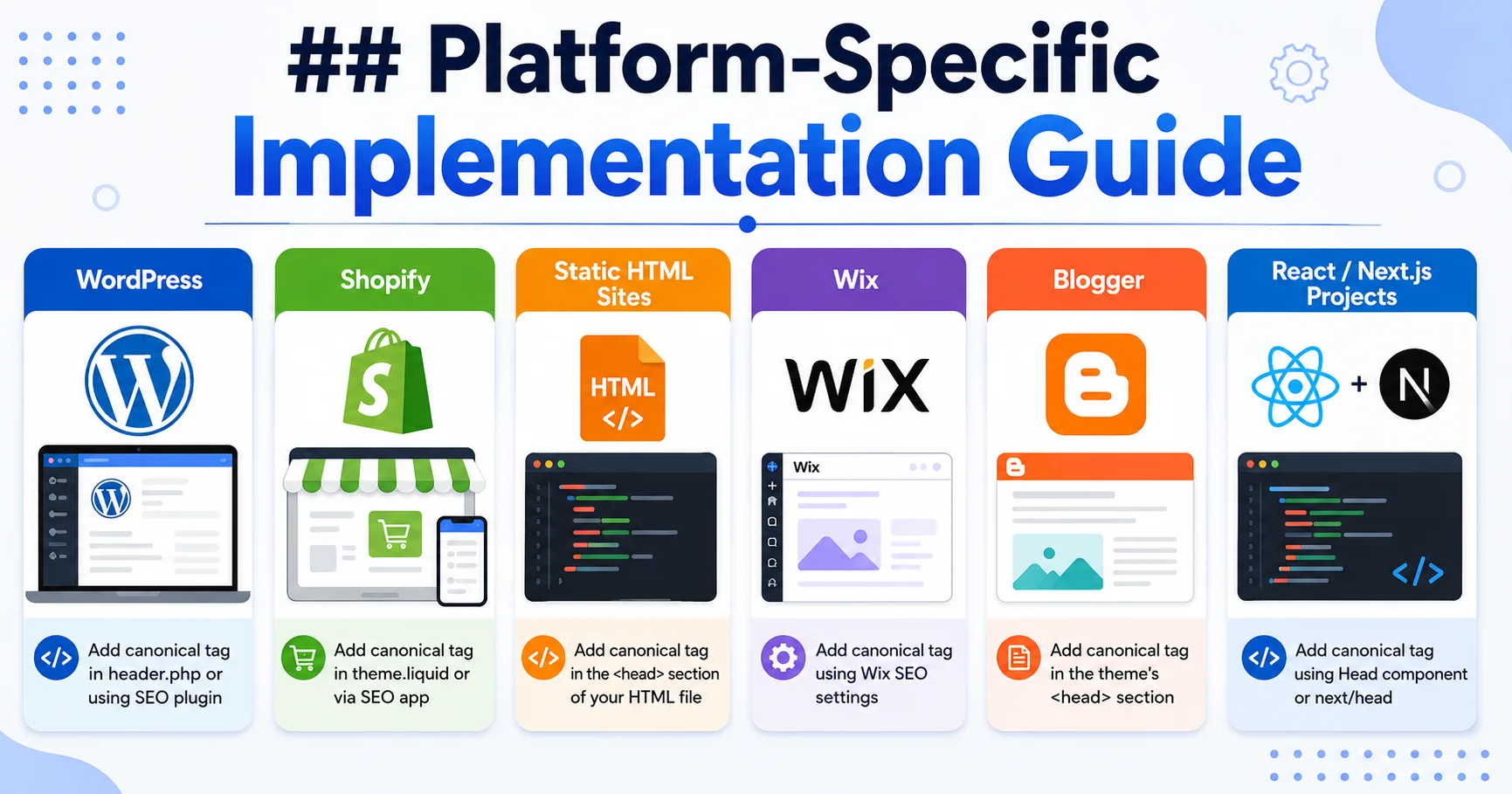
No matter which platform your site runs on, a Canonical Tag Generator produces the same universal HTML — only the placement steps change.
WordPress
Most WordPress sites already have canonical tags generated automatically through SEO plugins like Yoast SEO or RankMath. To override the default on a specific post, open the plugin’s advanced settings panel, paste your preferred canonical URL, and update the post.
Shopify
Shopify auto-generates canonical tags for products and collections, but if you need a manual override — for example, to consolidate duplicate variant URLs — edit your theme.liquid file and insert the canonical tag inside the <head> section.
Static HTML Sites
Open the HTML file directly in your code editor, locate the <head> section, and paste the generated tag right after your meta description. Save and re-upload the file to your server.
Wix and Blogger
Both platforms allow you to add custom code to individual pages through their SEO or advanced settings panels — paste the canonical tag there and republish the page.
React / Next.js Projects
Use a package like next-seo or manage the <Head> component directly to inject the canonical URL dynamically based on the current route, especially for dynamic or parameter-based pages.
Canonical Tag vs. Other SEO Signals
People often confuse canonical tags with other technical SEO tools. Here’s a clear comparison:
| Signal | What It Does | Best Used When |
|---|---|---|
| Canonical Tag | Suggests the preferred URL while keeping all versions accessible | Multiple URLs show the same or similar content |
| 301 Redirect | Permanently forwards users and crawlers to a new URL | The old page should no longer exist at all |
| Noindex Tag | Tells search engines not to index a page at all | The page has no SEO value and shouldn’t appear in search |
| Hreflang Tag | Points search engines to language or region-specific versions | Your site has multiple language or country variants |
A canonical tag is a hint, not a command — search engines usually respect it, but they can override it if other signals (like internal links or your sitemap) point elsewhere. That’s why consistency across your site structure matters just as much as the tag itself.
Common Canonical Tag Mistakes (And How to Fix Them)
Even with a reliable Canonical Tag Generator, mistakes can still happen if the wrong destination URL is chosen. Here are the most frequent issues site owners run into:
Mistake: Google ignores the canonical tag.
This usually happens when other signals contradict it — your sitemap, internal links, or redirects point to a different URL. Fix it by aligning every internal signal to the same target URL and confirming with Google Search Console’s URL Inspection tool.
Mistake: Canonical points to a redirected page.
If your canonical target itself returns a 301 redirect, search engines have to follow an extra hop, which weakens the signal. Always point directly to the final, live URL.
Mistake: Multiple canonical tags on one page.
When two or more canonical tags appear in the same <head>, search engines disregard all of them. Check your template code and plugin settings for duplicate insertions.
Mistake: Canonical placed in the body instead of the head.
A canonical tag has no effect outside the <head> section. Use “View Page Source” (not browser DevTools) to confirm placement on the live page.
Mistake: Mismatched trailing slashes.
If your canonical says /page but the server actually serves /page/, you create a conflict. Match the tag to your site’s real URL structure.
Mistake: Canonicalizing to a broken or blocked URL.
If the target URL is broken, blocked by robots.txt, or marked noindex, the canonical signal effectively points to a dead end. Always confirm the canonical target is live, crawlable, and indexable before publishing.
Mistake: Every page pointing to the homepage.
Some sites mistakenly set every canonical tag to the homepage URL to “play it safe.” This tells search engines that none of your inner pages are unique, which can wipe them out of search results entirely. Each page should canonicalize to its own relevant URL — usually itself.
Who Should Use This Canonical Tag Generator
- Bloggers and content creators syndicating articles across multiple platforms who need to protect their original source.
- E-commerce managers dealing with product variant URLs, filters, and sorting parameters.
- SEO consultants and agencies who need fast, accurate canonical tags for client deliverables.
- Affiliate marketers who want clean canonical URLs even when tracking parameters are present in the visible link.
- Developers building static sites or custom CMS platforms who need to generate canonical markup at build time.
Canonical Tag Generator Frequently Asked Questions
What’s the difference between a canonical tag and a 301 redirect?
A 301 redirect removes access to the old URL entirely and sends everyone to the new one. A canonical tag keeps both URLs live and accessible but tells search engines which one to prefer for ranking purposes.
onsiders canonical tags alongside other signals like internal linking and sitemaps before making a final decision.
How to Generate a Canonical Tag for a URL?
Enter your URL into a canonical tag generator and copy the generated HTML tag into your page’s <head> section.
What Is the Best Online Canonical Tag Generator?
A good online canonical tag generator quickly creates the correct canonical tag from your URL.
How to Generate a Free Canonical Tag?
Use a free canonical tag generator, enter your URL, and generate the tag instantly.
How to Generate a Canonical Tag in HTML?
Add this tag inside the <head> section:
<link rel="canonical" href="https://example.com/page/">
Is There a Canonical Tag Generator App?
Yes, online canonical tag generators can be used easily on mobile and desktop.
How to Check a Canonical Tag on a Website?
View the page source and search for rel="canonical" to find the canonical URL.
How to Generate Hreflang Tags for a Website?
Use a hreflang generator, enter your language and country URLs, and copy the generated tags.
What Is the Best Sitemap Generator for SEO?
A sitemap generator creates an XML sitemap that helps search engines discover your website pages.
Final Thoughts
Canonical tags might seem like a small technical detail, but they play a major role in how search engines interpret and rank your website. A single misplaced or missing canonical tag can quietly cost you traffic without any obvious warning sign. Using this Canonical Tag Generator takes the guesswork out of the process — enter your URL, get a clean, properly formatted tag, and place it exactly where it belongs.
Make it a habit to check your canonical tags after every major site update, CMS migration, or URL structure change, and your site will stay in a strong position for both traditional search rankings and the growing world of AI-powered search results.
Bookmark this Canonical Tag Generator and run your URLs through it every time you publish a new page, migrate your site, or notice duplicate content in Google Search Console. If you’re cleaning up your site’s technical SEO, also check out our full collection of free SEO tools — including the Sitemap Generator and Robots.txt Generator — to fix other common on-page and crawling issues alongside your canonical tags.